
When setting up your Simana project template, the first step is deciding how projects should be structured and what information teams need to capture throughout the improvement journey. The project template determines the sections, tools, and fields available to users when creating and managing projects in Simana.
This article will guide you through the three key decisions required to design your project template:
- Define the project sections
- Decide what information should be captured in the Charter
- Choose which tools and fields should be available in each section
Watch this video for a guided tour through some example projects for more information on how to answer the questions posed in this article:
Before You Start
To help design your template, it can be useful to review examples of existing projects and discuss how your organisation currently structures improvement work.
You may already have:
- Existing project templates
- Improvement frameworks or methodologies
- Governance requirements
- Reporting standards
- Standard project documentation
If so, sharing these materials with the Simana team will help ensure your template closely matches your current ways of working.
Step 1: Decide What Sections You Want
In Simana, each tile on the project board represents a section within the project template. These sections usually reflect:
- Your improvement methodology
- Your organisational terminology
- The stages teams follow during improvement work
Typical examples of project sections include:
- Charter / Project Information
- Driver Diagram
- Understanding the Problem
- Root Cause Analysis
- Countermeasures / PDSAs
- Measures / Monitoring
- Status Updates
- Implementation
The structure should feel familiar to staff and support the way improvement work is already delivered within your organisation.
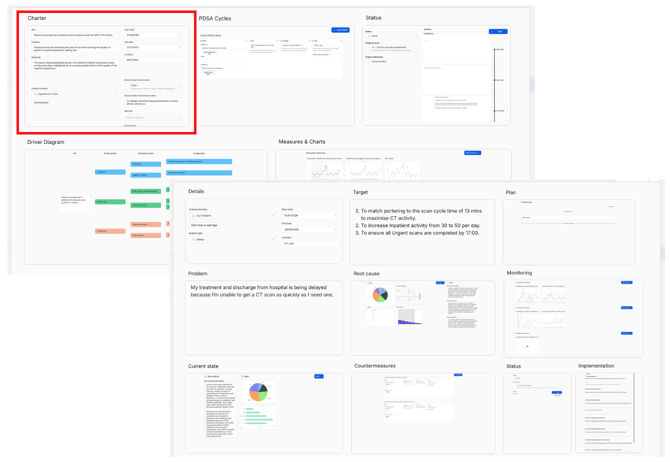
Image 1: Example project board showing project sections, with a Charter section highlighted in red.
Step 2: Define the Charter Fields
The Charter section (sometimes called Project Information) is typically the first section completed when a project is created.
This section is used to define:
- What the project is about
- Why the work is important
- How it aligns with organisational priorities
- Any governance or compliance requirements
Examples of information commonly captured include:
- Aim statement
- Problem statement
- Rationale
- Linked organisational priorities or objectives
- Programme or workstream links
- Regulatory requirements
- Safety incidents
- Project ownership information
Simana supports a range of field types that can be added to the Charter, including:
- Text fields
- Dropdown lists
- Dates
- Numbers
- Member lookup fields (users or departments)
- Tags
You can include as many fields as needed to support your governance and reporting requirements.
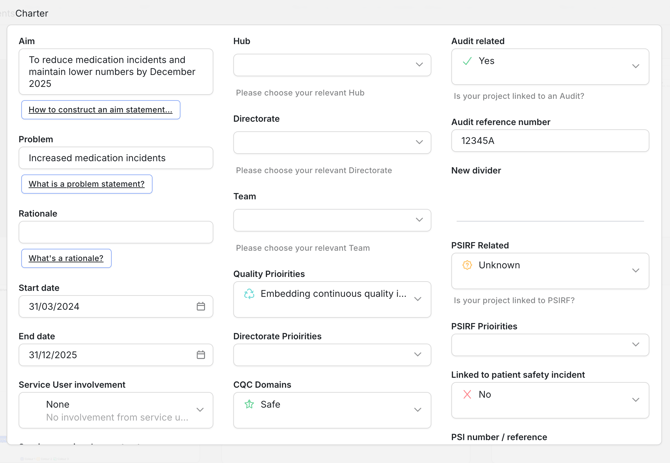
Image 2: Example Charter.
Step 3: Choose the Tools and Fields for Each Section
Once your project sections have been defined, the Simana team will populate each section with the most appropriate tools and fields.
However, if you have specific requirements about:
- Which tools should be included
- Which tools should not be included
- Any additional fields needed within a section
…these should be documented during the template design process.
Available Improvement Tools
Simana supports a wide range of quality improvement and improvement science tools that can be added to your project template.
Available tools include:
- Driver Diagram
- PDSA Cycle
- Fishbone Diagram
- Pareto Chart
- 5 Whys
- Bar Chart
- Line Chart
- Pie Chart
- Histogram
- Scatterplot
- SIPOC
- Force Field Analysis
- Kanban
- System of Profound Knowledge
- The 4 Ps
- Brainstorming
- Affinity Diagram
These tools can be configured within different sections depending on how your teams approach improvement work.
Recommended Next Steps
When preparing your template requirements, consider documenting:
- The sections you want included
- The fields required in the Charter
- Any mandatory governance information
- Which tools should appear in each section
- Any terminology specific to your organisation
Providing this information early helps ensure your Simana environment is configured to support your existing improvement processes and ways of working.