
Simana AI appears as a member of your organisation's team. To turn it off for the whole organisation, remove Simana AI from that top-level team.
Once removed, Simana AI is no longer accessible in the spaces, boards and cards owned by the organisation.
Before you start
You need access to Manage organisation and permission to manage the organisation's team.
Disable Simana AI
1. Open Manage organisation
In the navigation menu, go to Settings and select your organisation's name. Check the organisation name at the top of the Manage organisation panel.
2. Open the organisation's Team settings
Under Features, find Team and click the cog icon on the right of that row.
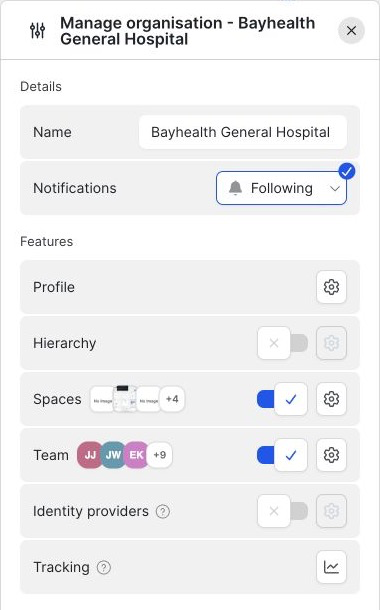
Open the Team settings using the cog beside Team.
3. Find Simana AI in the Users list
In the Team panel, look for Simana AI under Users. You can enter Simana AI in the Find members… search field to narrow the list.
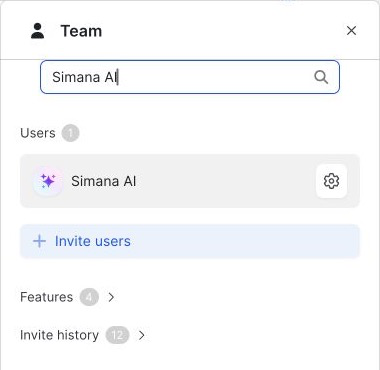
4. Open the Simana AI member settings
Click the cog icon beside Simana AI. The Configure member – Simana AI panel opens.
5. Remove Simana AI
Scroll to the bottom of the member settings panel. Under Actions, click Delete member. If a confirmation appears, check that it refers to Simana AI before confirming the removal.
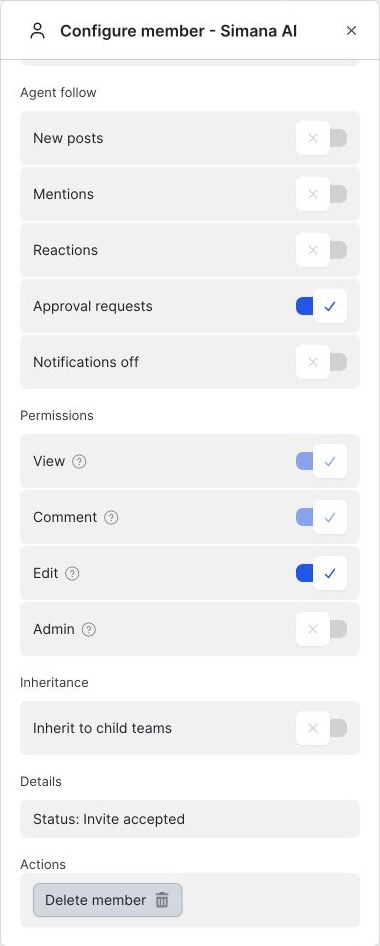
The Delete member button removes Simana AI from the organisation's team.
What happens next?
Removing Simana AI from the organisation's top-level team turns off its availability across the spaces, boards and cards owned by that organisation. You do not need to remove it separately from each of those areas.
To check the removal, return to the organisation's Team panel and search for Simana AI. It should no longer appear in the organisation's Users list.