
1. Open Threads
Select Threads in Simana’s navigation. Your direct and group conversations appear under Chats, above the Threads list.
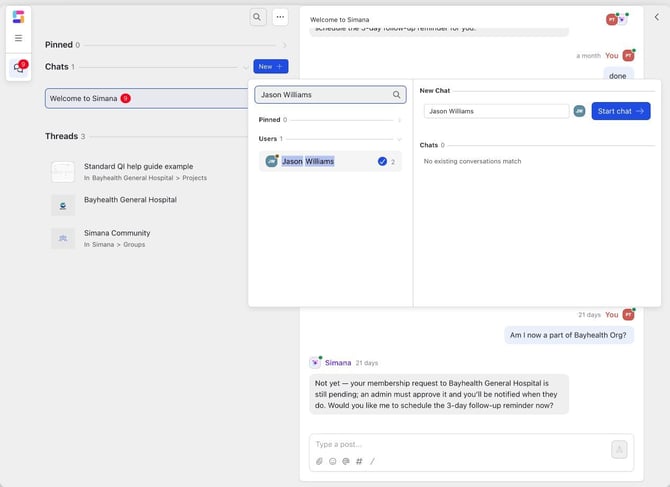
Click New + beside the Chats heading to open the New Chat window.
2. Choose who to message
Use the search box in the New Chat window to find a colleague.
A blue tick marks the selected person. Their avatar appears beside the chat name, and Start chat becomes available.
3. Start the chat
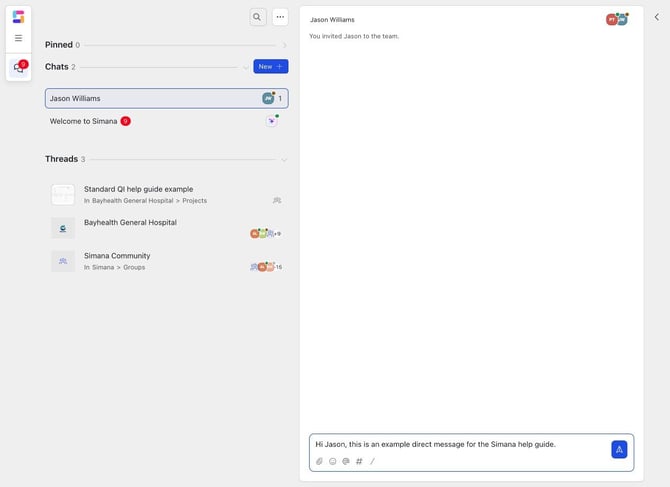
Click Start chat. Simana opens the conversation and adds it to your Chats list.
Check the name at the top of the conversation before writing your message.
4. Write and post your message
Click Type a post… at the bottom of the conversation and enter your message.
Click the Post button—the arrow at the right of the message box—to send it.
5. Continue the conversation
Your posted message appears in the conversation, and the message box clears ready for your next post.
To return to the conversation later, open Threads and select the relevant Chat!
Create and name a group chat
1. Open Threads and click New + beside Chats
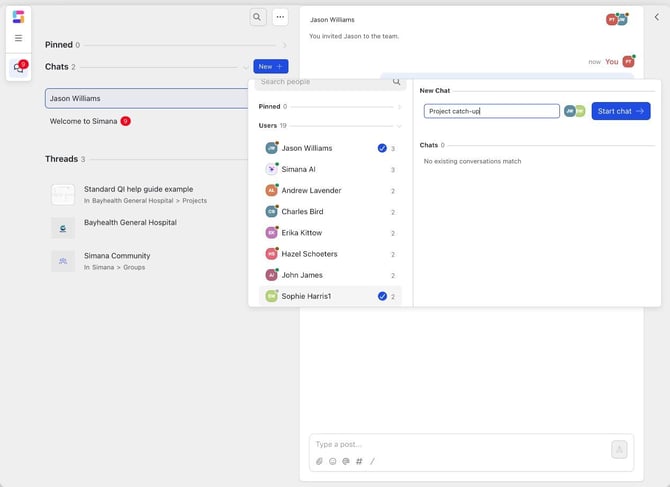
2. Select each colleague you want to include. Use the search box to find people; clear or replace the search text to find another colleague. Check that everyone you want has a blue tick.
3. Click the chat name field beside Start chat. Replace the suggested names with a clear group name, such as Project catch-up.
4. Click Start chat to create the group conversation.
5. Write your first message in Type a post…, then click Post.
Your group conversation appears under Chats with the name you entered.
Tip: Choose a name that describes the purpose of the conversation so it is easy to find again.
Start a direct chat with Simana AI
1. Open Threads and click New + beside Chats.
2. Find and select Simana AI in the people list. For a direct AI chat, select only Simana AI.
3. Click Start chat, type your question, and click Post.